Project Description
Objective
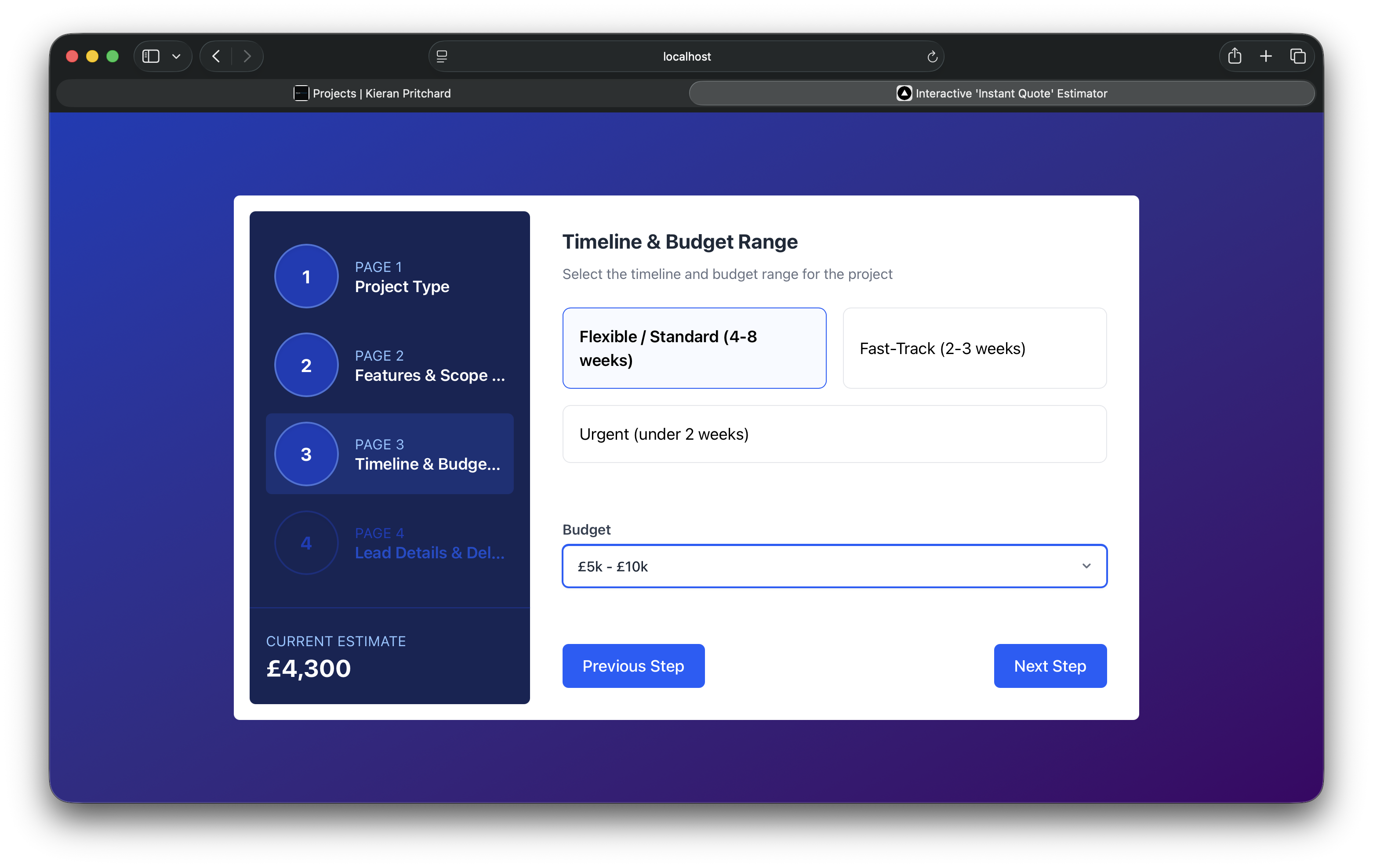
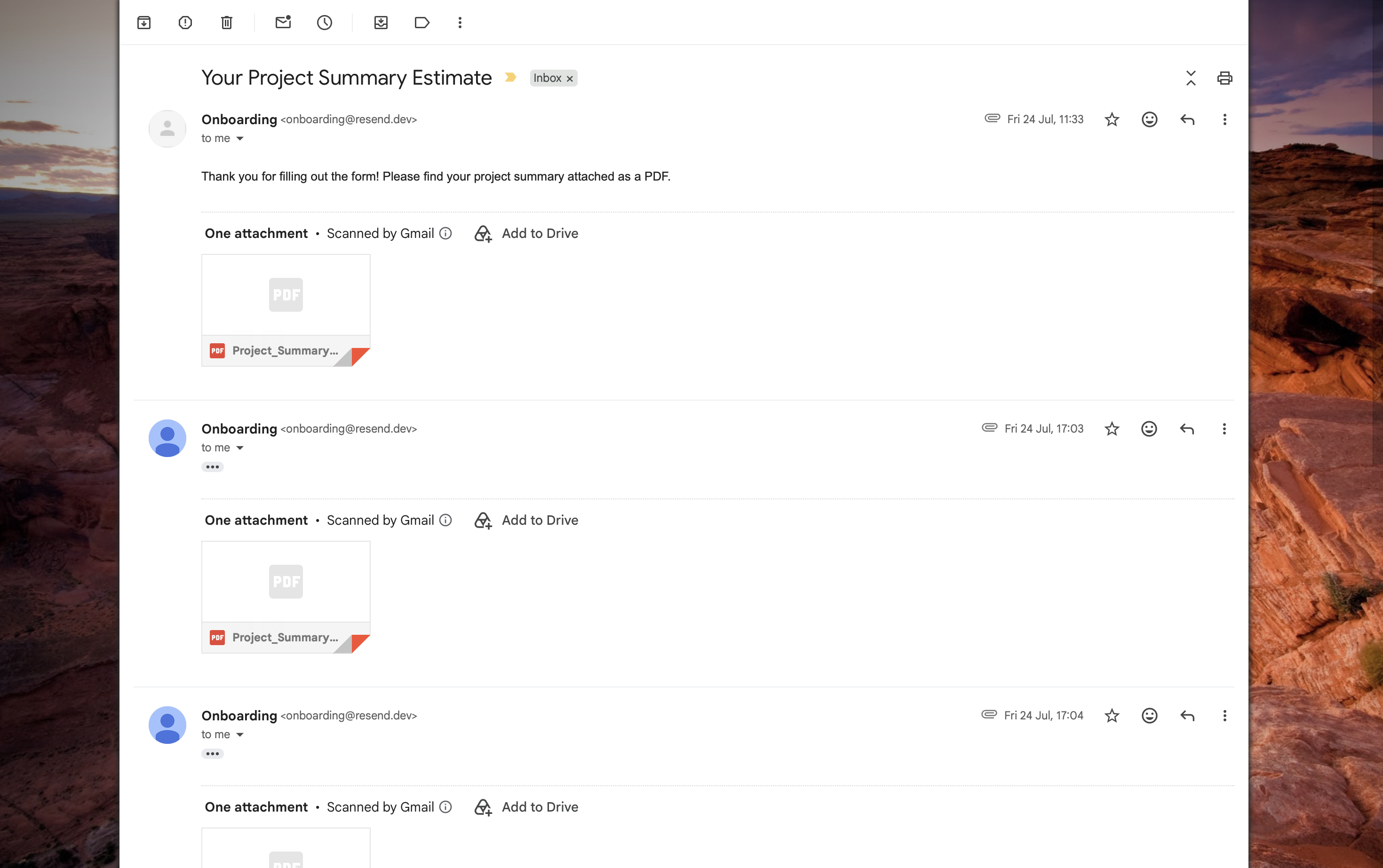
To build a multi-step quote tool for potential freelance clients, where they can work through their project requirements and see a real-time cost estimate as they go. On submission it saves the lead to a database, generates a custom PDF summary, and emails it to the client automatically.
Features
- Dynamic Real-Time Cost Calculation: instant price feedback based on project scope, features, design readiness, and timeline.
- Multi-Step Form Workflow: guided steps with validation and state preserved between them.
- Server Actions: lead submission is handled server-side rather than through a client-exposed API route.
- Database Persistence: saves every submission to a
quotestable in PostgreSQL / Supabase. - PDF Generation and Email Delivery: renders a custom PDF report with
@react-pdf/rendererand emails it out using Resend. - Thank-You Flow: redirects to a confirmation page on successful submission.
- Docker and Docker Compose Support: self-hosted Supabase stack (PostgreSQL, PostgREST, Auth, Kong Gateway) included, so the whole thing runs locally or on a server without needing a hosted Supabase project.
Technology and Tools Used
- Framework: Next.js 16 (App Router, Server Actions).
- Framework/Library: React 19, Tailwind CSS v4, Lucide React, Zod,
@react-pdf/renderer. - Database and Backend: Supabase (PostgreSQL, PostgREST).
- Email: Resend.
- Tools: Git, VS Code, Docker, Docker Compose.
Challenges Faced
PDF and Email Pipeline: Getting the PDF generation and email step to work reliably took a bit of trial and error. @react-pdf/renderer needed to render the document server-side before Resend could send it as an attachment, so I had to get the order right between the database write, the PDF render, and the email send, without one step failing silently and leaving a lead half-saved.
Wiring Up Supabase Locally: Self-hosting Supabase with Docker Compose instead of using a hosted project meant setting up PostgreSQL, PostgREST, Auth, and the Kong Gateway myself and getting them talking to each other correctly. Getting the local API Gateway and keys configured so the Next.js app could actually connect took a few attempts before it all lined up.
Outcome
The tool works end to end: a client fills in the form, sees their estimate update live, and on submit the lead is saved, a PDF summary lands in their inbox, and they're redirected to a thank-you page. It gave me practical experience with Server Actions, self-hosting Supabase with Docker Compose, and tying together form state, a database, and an email pipeline into one working flow.
How to Use the Project
-
Clone the Repository:
- Use git to clone the project.
git clone <repository-url>cd interactive_quote_estimator
-
Set Up Environment Variables:
- Copy the example env file:
cp .env.example .env - Fill in your own values, including your
RESEND_API_KEY.
- Copy the example env file:
-
Run with Docker Compose (recommended):
- This spins up the Next.js app alongside a self-hosted Supabase stack.
docker compose up -d --build- Web App: http://localhost:3000
- Supabase API Gateway:
http://localhost:54321 - PostgreSQL:
localhost:54322
-
Or Run Locally Without Docker:
- Install dependencies:
npm install- Create a
.env.localfile in the root directory:
NEXT_PUBLIC_SUPABASE_URL=http://127.0.0.1:54321 NEXT_PUBLIC_SUPABASE_PUBLISHABLE_KEY=your_publishable_key SUPABASE_SERVICE_ROLE_KEY=your_service_role_key RESEND_API_KEY=your_resend_api_key- Start the dev server:
npm run dev- Open http://localhost:3000.
-
Environment Variables Reference:
NEXT_PUBLIC_SUPABASE_URL: URL of the Supabase API Gateway.NEXT_PUBLIC_SUPABASE_PUBLISHABLE_KEY: Public/anon key for Supabase client queries.SUPABASE_SERVICE_ROLE_KEY: Admin service role key, used by Server Actions to bypass RLS.SUPABASE_SECRET_KEY: Secret key format used by newer local Supabase instances.RESEND_API_KEY: API key for Resend email delivery.
-
Database Schema:
- When starting with Docker Compose, the
quotestable is created automatically viasupabase/init.sql:
CREATE TABLE IF NOT EXISTS public.quotes ( id BIGINT GENERATED BY DEFAULT AS IDENTITY PRIMARY KEY, created_at TIMESTAMP WITH TIME ZONE DEFAULT timezone('utc'::text, now()) NOT NULL, name TEXT NOT NULL, email TEXT NOT NULL, company TEXT NOT NULL, project_type TEXT NOT NULL, design_readiness TEXT NOT NULL, number_of_pages INT NOT NULL, features TEXT NOT NULL, timeline TEXT NOT NULL, budget TEXT NOT NULL, notes TEXT ); - When starting with Docker Compose, the
Licenses
License is located in the root of the repository.